
Fixing a Crop Rotation: A Canberra Four-Bed Plan With an AI Assistant
A worked example of the Crop Rotation Planner and an AI assistant working together: an invented Canberra household tells the AI what each of four beds grew over three years and what they planned next, the tool flags a repeated plant family in all four beds, and the AI’s revised plan clears every warning. Both screens below are the real tool.
At a glance
- Tool: Crop Rotation Planner
- Scenario: four vegetable beds, three years of history and a planned next crop
- Climate zone: Cool Temperate (Canberra, with hard frosts and a shorter growing season)
- Handoff method: a direct link (about 351 characters); a file works too
- Result: 4 warnings on the household’s own plan, 0 on the AI’s revision
The situation
Imagine a household in Canberra with four raised vegetable beds. They’ve kept rough notes of what grew where for three years, and they have a plan for the coming season that mostly repeats what worked. They’ve heard that planting the same family in the same bed year after year invites disease and pests, but they can’t easily tell whether “tomato, then peas, then carrot” breaks the rule, because crops in the same family don’t always look related. Potato and tomato, for example, are both nightshades.
The Crop Rotation Planner checks exactly that. For each bed you record three years of history plus the next crop, and it warns whenever one plant family appears twice in that bed. The AI’s job is to enter the history faithfully and propose a next-year crop for each bed that clears the warnings.
What they tell the AI
No technical knowledge is needed. This is everything the person supplies:
- Four beds, each with three years of history, oldest first.
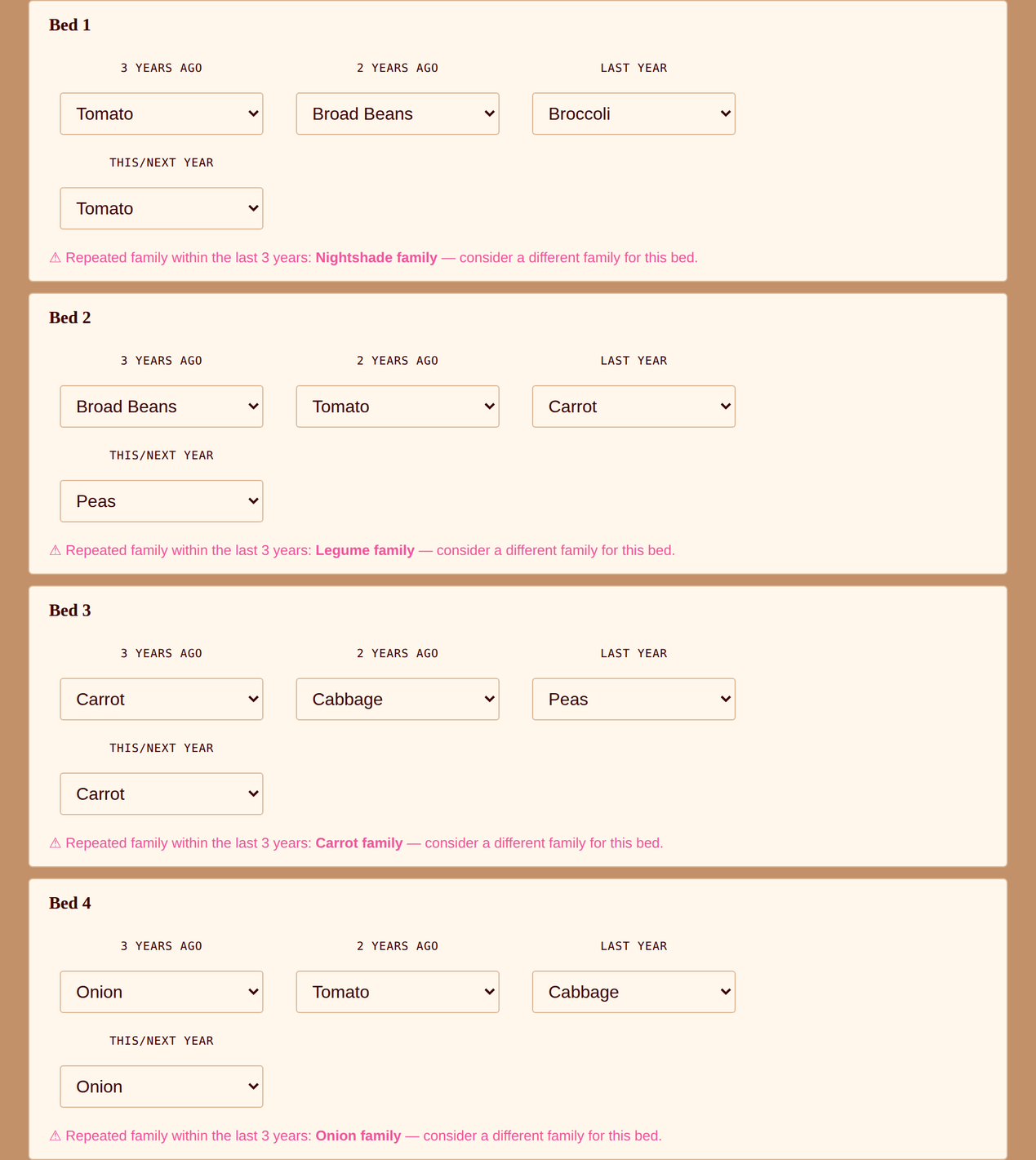
- Bed 1: tomato, broad beans, broccoli. Bed 2: broad beans, tomato, carrot. Bed 3: carrot, cabbage, peas. Bed 4: onion, tomato, cabbage.
- Their plan for the coming year: tomato in Bed 1, peas in Bed 2, carrot in Bed 3 and onion in Bed 4.
- A request to check the plan by plant family and fix anything that repeats.
The prompt
Every handoff tool on this site has a Copy AI Prompt button that puts a ready-made instruction on your clipboard. They paste it into their AI assistant and fill in the bracketed part:
This is the one example where the person hands over a plan they already have, rather than a wish. The AI’s task is checking and fixing, not inventing.
What the AI does, step by step
- Reads the tool page. It finds the embedded format block and learns two things: this tool stores a
stateobject rather than theslotsused by the other tools, and each bed is an array of exactly four entries, in the order three years ago, two years ago, last year, this or next year. - Uses the exact crop names. The tool recognises crops only by the names on its own list, so the AI uses that list’s spelling, such as “Broad Beans”. A name the tool can’t match shows as a blank box. Beds are numbered from zero in the file:
bed0is Bed 1 on the screen. - Enters the household’s own plan first. To show the problem, the AI loads the plan as the household described it. The tool flags a repeated family in every bed.
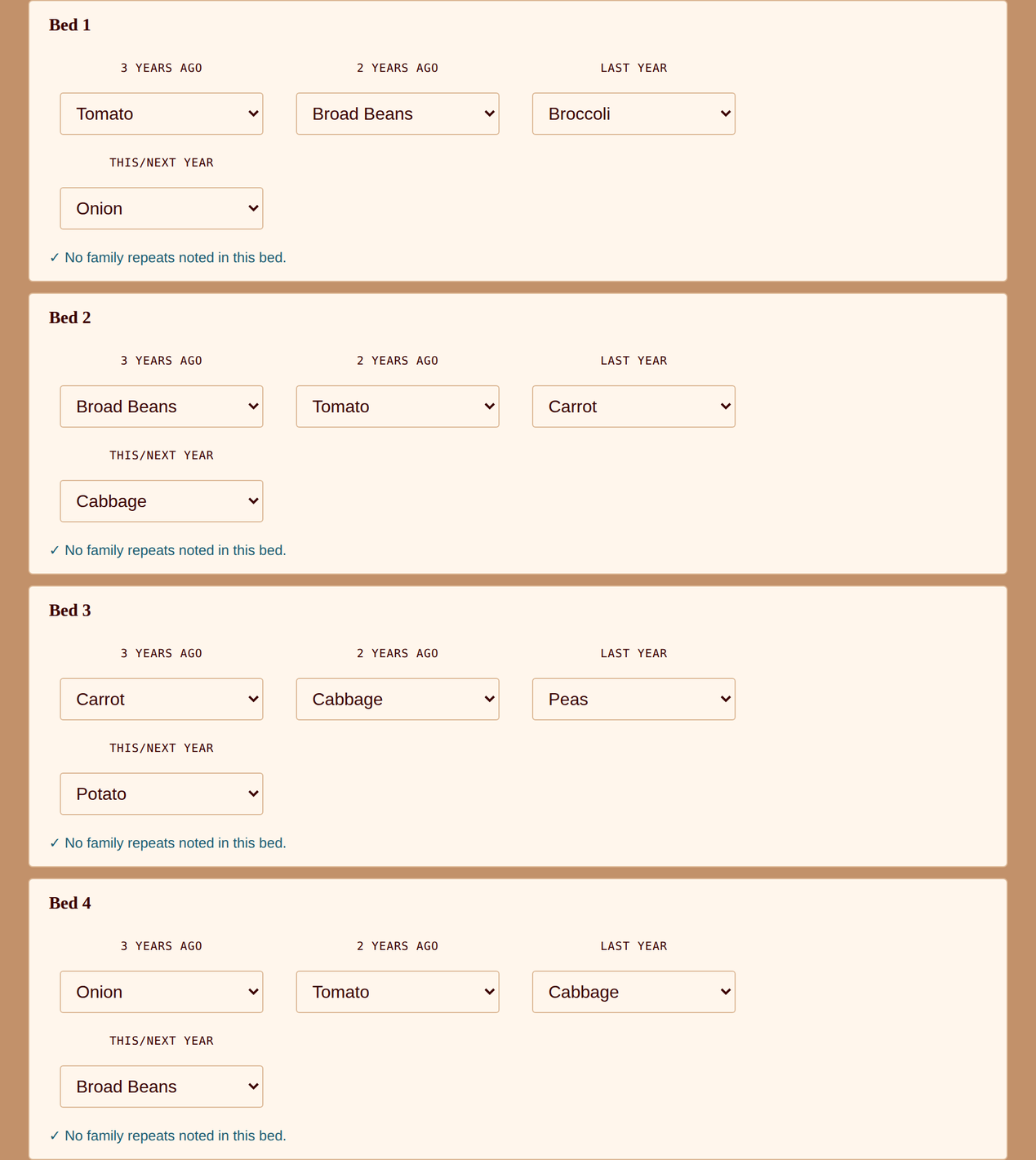
- Picks replacements by family. For each bed it looks at the families already used and chooses a next crop from one that hasn’t appeared: onion for Bed 1, cabbage for Bed 2, potato for Bed 3 and broad beans for Bed 4.
- Balances the garden. The four replacements are one of each group — alliums, brassicas, nightshades and legumes — so the whole garden stays in step rather than every bed swinging the same way.
- Builds the link. Four beds fit easily into a link of about 361 characters.
What the AI hands back
Two links: the household’s plan as written, so they can see the warnings for themselves, and the AI’s revision. Nothing is uploaded and no account is needed.
Open the plan as the household wrote it →
Open the AI’s revised plan →
Because the revised plan is small, it fits in a link. For a copy to keep, the AI would produce this file, saved with a .json extension (a .txt with the same content also works). Importing it replaces whatever layout the tool is currently showing, after a confirmation prompt:
{
  "hollysHomesteadExport": "rotation-planner",
  "exportedAt": "2026-10-05T00:00:00.000Z",
  "state": {
    "bed0": [
      "Tomato",
      "Broad Beans",
      "Broccoli",
      "Onion"
    ],
    "bed1": [
      "Broad Beans",
      "Tomato",
      "Carrot",
      "Cabbage"
    ],
    "bed2": [
      "Carrot",
      "Cabbage",
      "Peas",
      "Potato"
    ],
    "bed3": [
      "Onion",
      "Tomato",
      "Cabbage",
      "Broad Beans"
    ]
  }
}
The result
First, the household’s own plan, loaded into the real tool. Every bed has a warning:
Then the AI’s revision. Same history, different crop for the coming year, and every warning is gone:
| Bed | Last three years | Household’s plan | AI’s revision |
|---|---|---|---|
| Bed 1 | Tomato → Broad Beans → Broccoli | Tomato (Nightshade) | Onion (Onion) |
| Bed 2 | Broad Beans → Tomato → Carrot | Peas (Legume) | Cabbage (Brassica) |
| Bed 3 | Carrot → Cabbage → Peas | Carrot (Carrot) | Potato (Nightshade) |
| Bed 4 | Onion → Tomato → Cabbage | Onion (Onion) | Broad Beans (Legume) |
What the numbers mean
Every bed had a hidden repeat. It’s easy to miss because the repeated crops aren’t always the same plant. Bed 1’s tomato and Bed 2’s peas look fine in isolation; in each bed the same family had already been there. Bed 3’s carrot was the most obvious, and the tool caught the less obvious ones just as readily.
The fix is by family, not by crop. Swapping tomato for potato in Bed 1 wouldn’t have helped, because both are nightshades. That’s the whole value of the planner: it knows the families so the household doesn’t have to.
The AI’s revision also balances the garden. This year there is one bed each of alliums, brassicas, nightshades and legumes, so next year’s plan can simply shift each group along one bed.
What “no warnings” means. It means no plant family repeats within that bed’s four-year window. It does not mean the plan is perfect: the tool checks families, not soil health, timing, frost or what else is in the bed.
Follow-up prompts worth trying
The first answer is rarely the last. The same conversation can keep refining the plan:
- “Plan the next three years for all four beds so no family returns within four years.” — the AI extends the rotation, though the tool’s window is four entries, so you’ll roll it forward each year.
- “Add a fifth bed for pumpkin, zucchini and cucumber, and tell me where it fits in the rotation.” — the planner supports up to ten beds.
- “Which of these should I sow in autumn and which after the last frost?” — timing is outside this tool; see the climate zone tool and the grow guides.
- “What should go on the legume bed to make the most of it?” — the how-to guide on crop rotation planning covers the reasoning.
What to check yourself
An AI is quick at turning a description into a filled-in tool, which is why this works. It is not a substitute for checks only you can do:
- Check the spelling in the tool. A crop name the tool doesn’t recognise shows as a blank box, not an error. If a bed looks short a crop, a name was probably misspelled or isn’t on the tool’s list.
- Check the history order. The four entries are oldest first, ending with this or next year. Reversed history gives you a plausible-looking plan for the wrong years.
- Check the bed numbers. The file counts from zero, so
bed0is Bed 1. A mix-up leaves the right crops in the wrong beds. - The tool checks families only. It doesn’t know about your soil, disease history, cover crops, perennials or frost. A clear result is a good start, not a guarantee.
- Frost and season length decide the timing. Canberra’s hard frosts mean frost-tender crops such as tomato and potato go in after the last frost; the NT and ACT environmental conditions page has real frost data for your region.
Doing this in a different climate?
Plant families are the same everywhere, so the rotation logic doesn’t change across Australia. What changes is the crops you rotate and when you plant them. Tell your AI your postcode or climate zone:
- Tropical and Subtropical (Darwin, Brisbane): warm-season families such as nightshades, cucurbits, legumes like snake beans and mallow (okra) dominate, and beds can often take two crops in a year.
- Warm Temperate and Mediterranean (Sydney, Perth, Adelaide): a split between a cool-season and a summer bed set, with the same family-by-family logic.
- Cool Temperate (Canberra, Hobart, Melbourne): a single main summer season, so each bed carries one big crop group a year, as in this example.
- Arid (Alice Springs): fewer beds and more shade structures; the same family rule applies, with water as the real limit.
More examples, across other tools and climate zones, are on the AI Examples page.