
Setting Up My Notebook: An Adelaide Hills Newcomer and an AI Assistant
A worked example of My Notebook and an AI assistant working together: an invented newcomer to the Adelaide Hills describes what they want to read first, and the AI hands back a ready-made notebook of 12 saved pages and 3 notes, one of them tied to the South Australian council livestock rules. The screens below are the real tool.
At a glance
- Tool: My Notebook
- Scenario: a newcomer organising their first-year reading list and to-do notes
- Climate zone: Mediterranean (Adelaide Hills, South Australia)
- Handoff method: a downloadable file (the link would run to about 5,000 characters, so a file is the better choice)
- Result: 12 saved pages and 3 notes, merged into the notebook
The situation
Imagine someone who has just moved onto a small property in the Adelaide Hills. They know nothing yet about council rules, rainwater tanks or what a first year looks like, and the site has dozens of pages that could help. Bookmarking them one by one is slow, and a browser bookmark list does nothing to remind them why a page mattered.
My Notebook keeps saved pages and your own notes in one place, in your browser. It’s the one tool here that isn’t a calculator: nothing is worked out, so the AI’s job is curation. It picks the right pages for the person’s situation and writes short notes that say what to do with them.
What they tell the AI
No technical knowledge is needed. This is everything the person supplies:
- That they’re new to a small property in the Adelaide Hills.
- The pages they want saved: council rules, the SA environmental conditions page, soil, mulching, water, garlic, hens, and the cost and block planning tools.
- Three short notes: check council livestock rules before buying animals, work out water before beds, and an order of jobs for the first year.
The prompt
Every handoff tool on this site has a Copy AI Prompt button that puts a ready-made instruction on your clipboard. They paste it into their AI assistant and fill in the bracketed part:
The prompt describes things in plain words. The AI does the work of finding exact pages and titles.
What the AI does, step by step
- Reads the tool page. It finds the embedded format block. Unlike the other tools, this file has no wrapper:
savedPagesandnotessit at the top level. - Finds the right pages. Each saved page needs its full address on hollyshomestead.com.au, a title and a category. The tool shows the title and category exactly as given, so the AI uses the page’s real title and the label the site gives it.
- Picks the South Australian pages. Because the person is in the Adelaide Hills, it chooses the SA council livestock rules, the SA land and water rules and the SA environmental conditions page, rather than another state’s.
- Writes the notes. Each note has its own unique id, a title and a body. Two are linked to a saved page so the note and its source stay together; the third is free-standing.
- Chooses a file. Twelve pages and three notes make a link of about 5063 characters, well past the roughly 2,000 that browsers and chat apps handle reliably, so the AI hands back a file.
What the AI hands back
A .json file (a .txt with the same content works too, which helps on AI apps that only offer text downloads). The person opens My Notebook and uses Import a Notebook File. Importing merges: pages already saved, matched by address, are skipped, and notes are matched by id, so nothing is overwritten and importing twice does no harm. Here is the file in full:
{
  "savedPages": [
    {
      "url": "https://hollyshomestead.com.au/blog/real-cost-of-setting-up-a-homestead.html",
      "title": "The Real Cost of Setting Up a Homestead in Australia",
      "category": "Blog",
      "savedAt": "2026-10-05T00:00:00.000Z"
    },
    {
      "url": "https://hollyshomestead.com.au/tools/find-my-climate-zone.html",
      "title": "Find My Climate Zone",
      "category": "Tools",
      "savedAt": "2026-10-05T00:00:00.000Z"
    },
    {
      "url": "https://hollyshomestead.com.au/tools/sa-environmental-conditions-by-region.html",
      "title": "SA Environmental Conditions by Region",
      "category": "Tools",
      "savedAt": "2026-10-05T00:00:00.000Z"
    },
    {
      "url": "https://hollyshomestead.com.au/tools/sa-council-livestock-rules.html",
      "title": "South Australian Livestock Rules by Council",
      "category": "Tools",
      "savedAt": "2026-10-05T00:00:00.000Z"
    },
    {
      "url": "https://hollyshomestead.com.au/tools/sa-council-land-water-rules.html",
      "title": "South Australian Land & Water Rules by Council",
      "category": "Tools",
      "savedAt": "2026-10-05T00:00:00.000Z"
    },
    {
      "url": "https://hollyshomestead.com.au/how-to-guides/soil-compost/building-healthy-soil.html",
      "title": "Building Healthy Soil \u2014 How-To Guide",
      "category": "Soil & Compost",
      "savedAt": "2026-10-05T00:00:00.000Z"
    },
    {
      "url": "https://hollyshomestead.com.au/how-to-guides/water/rainwater-harvesting-tank-sizing.html",
      "title": "Rainwater Harvesting & Tank Sizing \u2014 How-To Guide",
      "category": "Water",
      "savedAt": "2026-10-05T00:00:00.000Z"
    },
    {
      "url": "https://hollyshomestead.com.au/how-to-guides/soil-compost/mulching.html",
      "title": "Mulching \u2014 How-To Guide",
      "category": "Soil & Compost",
      "savedAt": "2026-10-05T00:00:00.000Z"
    },
    {
      "url": "https://hollyshomestead.com.au/grow-guides/alliums/garlic.html",
      "title": "Garlic \u2014 Grow Guide",
      "category": "Alliums",
      "savedAt": "2026-10-05T00:00:00.000Z"
    },
    {
      "url": "https://hollyshomestead.com.au/animal-guides/poultry/laying-hens.html",
      "title": "Laying Hens \u2014 Animal Guide",
      "category": "Poultry",
      "savedAt": "2026-10-05T00:00:00.000Z"
    },
    {
      "url": "https://hollyshomestead.com.au/tools/cost-estimator.html",
      "title": "Setup Cost Estimator",
      "category": "Tools",
      "savedAt": "2026-10-05T00:00:00.000Z"
    },
    {
      "url": "https://hollyshomestead.com.au/tools/block-planner.html",
      "title": "Homestead Block Planner",
      "category": "Tools",
      "savedAt": "2026-10-05T00:00:00.000Z"
    }
  ],
  "notes": [
    {
      "id": "nadelaidehills01",
      "title": "Check council rules before buying animals",
      "body": "Confirm the livestock limits for our council before we buy any hens or goats. Ask about minimum lot size, distance from neighbours and whether a permit is needed. Do this BEFORE ordering anything.",
      "linkedUrl": "https://hollyshomestead.com.au/tools/sa-council-livestock-rules.html",
      "linkedTitle": "South Australian Livestock Rules by Council",
      "createdAt": "2026-10-05T00:00:00.000Z",
      "updatedAt": "2026-10-05T00:00:00.000Z"
    },
    {
      "id": "nadelaidehills02",
      "title": "Water first",
      "body": "Work out how much roof we have and what tank size makes sense before planning any beds. Summers here are dry, so water decides how big the garden can be.",
      "linkedUrl": "https://hollyshomestead.com.au/how-to-guides/water/rainwater-harvesting-tank-sizing.html",
      "linkedTitle": "Rainwater Harvesting & Tank Sizing \u2014 How-To Guide",
      "createdAt": "2026-10-05T00:00:00.000Z",
      "updatedAt": "2026-10-05T00:00:00.000Z"
    },
    {
      "id": "nadelaidehills03",
      "title": "Order of jobs for the first 12 months",
      "body": "1. Council rules and water. 2. Soil and mulch. 3. Garlic in autumn. 4. Hens once the coop and rules are sorted. 5. Re-run the cost estimator with real quotes.",
      "linkedUrl": null,
      "linkedTitle": null,
      "createdAt": "2026-10-05T00:00:00.000Z",
      "updatedAt": "2026-10-05T00:00:00.000Z"
    }
  ]
}
The result
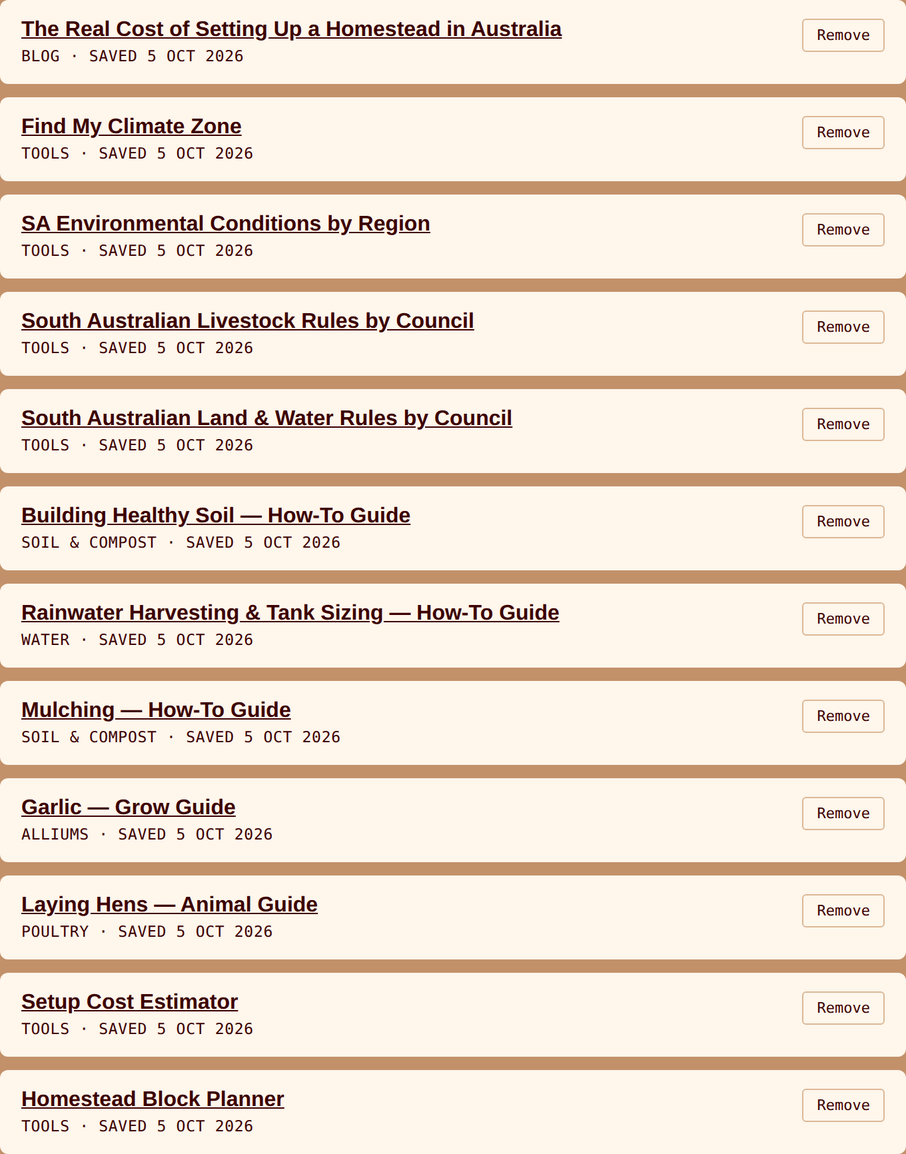
These are the real notebook screens after the import. First the saved pages:
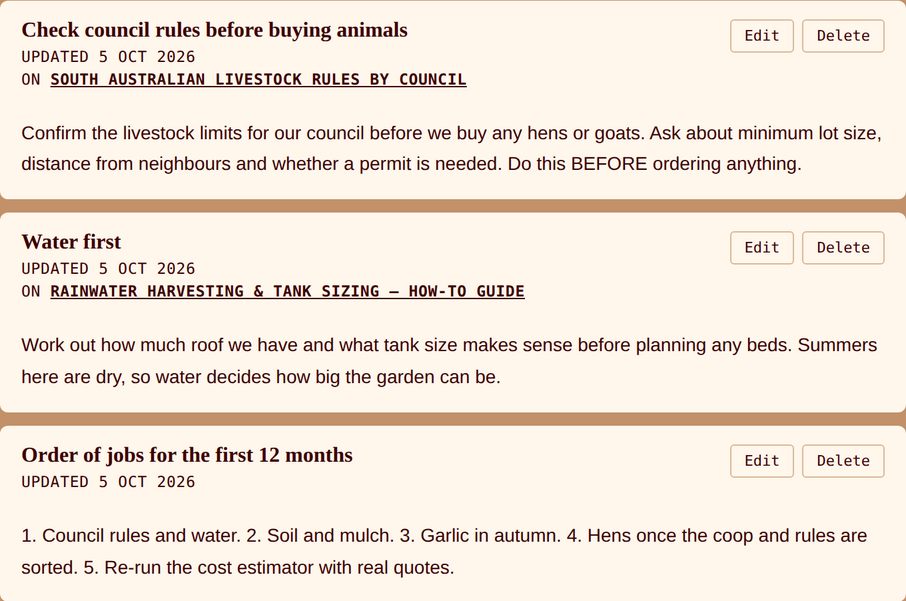
And the three notes:
| Saved page | Category |
|---|---|
| The Real Cost of Setting Up a Homestead in Australia | Blog |
| Find My Climate Zone | Tools |
| SA Environmental Conditions by Region | Tools |
| South Australian Livestock Rules by Council | Tools |
| South Australian Land & Water Rules by Council | Tools |
| Building Healthy Soil — How-To Guide | Soil & Compost |
| Rainwater Harvesting & Tank Sizing — How-To Guide | Water |
| Mulching — How-To Guide | Soil & Compost |
| Garlic — Grow Guide | Alliums |
| Laying Hens — Animal Guide | Poultry |
| Setup Cost Estimator | Tools |
| Homestead Block Planner | Tools |
| Note | Linked to |
|---|---|
| Check council rules before buying animals | South Australian Livestock Rules by Council |
| Water first | Rainwater Harvesting & Tank Sizing — How-To Guide |
| Order of jobs for the first 12 months | not linked |
What this means
The notebook is a starting shelf, not a plan. It orders the person’s first questions: council rules and water before anything is bought or dug.
Linked notes travel with their source. The council-rules note sits against the livestock page it refers to, so the reminder and the evidence stay together.
It stays on the person’s device. Everything lives in the browser. Nothing is uploaded, so the person can use Download My Notebook to take it to another device.
The AI chose the pages, not the person’s rules. The notes are the AI’s wording. The council rules themselves are on the saved pages, and the person still needs to confirm them with their own council.
Follow-up prompts worth trying
The first answer is rarely the last. The same conversation can keep refining the plan:
- “Add a note for each month of autumn with what to sow, linked to the right grow guides.” — the AI adds notes and guide pages for the same notebook.
- “Save the grow guides for everything on my list of vegetables.” — the AI picks pages by name.
- “Turn my notes into a one-page checklist I can print.” — use the AI directly, outside the tool.
- “Now do the same for a friend in Cairns.” — the AI swaps in the Queensland pages and tropical guides.
What to check yourself
An AI is quick at turning a description into a filled-in tool, which is why this works. It is not a substitute for checks only you can do:
- Check every address. A saved page with a wrong address still appears in the notebook but its link goes nowhere. Open a few from the list.
- Titles come from the AI. The notebook shows whatever title the file contains, so make sure it matches the page.
- Importing merges, never replaces. Your existing notebook is untouched, so a wrong import only needs the extra items removed.
- Council rules change. The pages summarise rules by council; confirm with your council before buying animals or building.
- Notes are your own words in the end. Edit the AI’s wording until it says what you mean.
Doing this in a different climate?
The notebook works the same way anywhere, but the pages worth saving depend on where you live. Tell your AI your state or climate zone:
- Tropical and Subtropical (Darwin, Brisbane): wet and dry season guides, cyclone and flood notes, and tropical crops.
- Warm Temperate (Sydney): council rules for the relevant state and the year-round growing guides.
- Mediterranean (Perth, Adelaide): water-first notes, summer heat and fire-season pages, as in this example.
- Cool Temperate (Melbourne, Hobart, Canberra): frost dates, shorter seasons and cool-climate crops.
- Arid (Alice Springs): water, shade and heat pages first.
More examples, across other tools and climate zones, are on the AI Examples page.